

Overview
Vonage customers can configure call forwarding to enable your Recepta.ai voice agent to answer incoming calls. This guide walks you through the complete setup process, from obtaining your Recepta.ai phone number to configuring Vonage’s call routing.Getting Your Recepta.ai Phone Number
Before configuring Vonage, you’ll need to obtain your dedicated Recepta.ai phone number.Access Your Dashboard
Navigate to your Recepta.ai dashboard at https://recepta.ai/dashboard
Locate Your Phone Number
Your Recepta.ai phone number will be displayed prominently in the dashboard. Copy this number as you’ll need it for the Vonage configuration.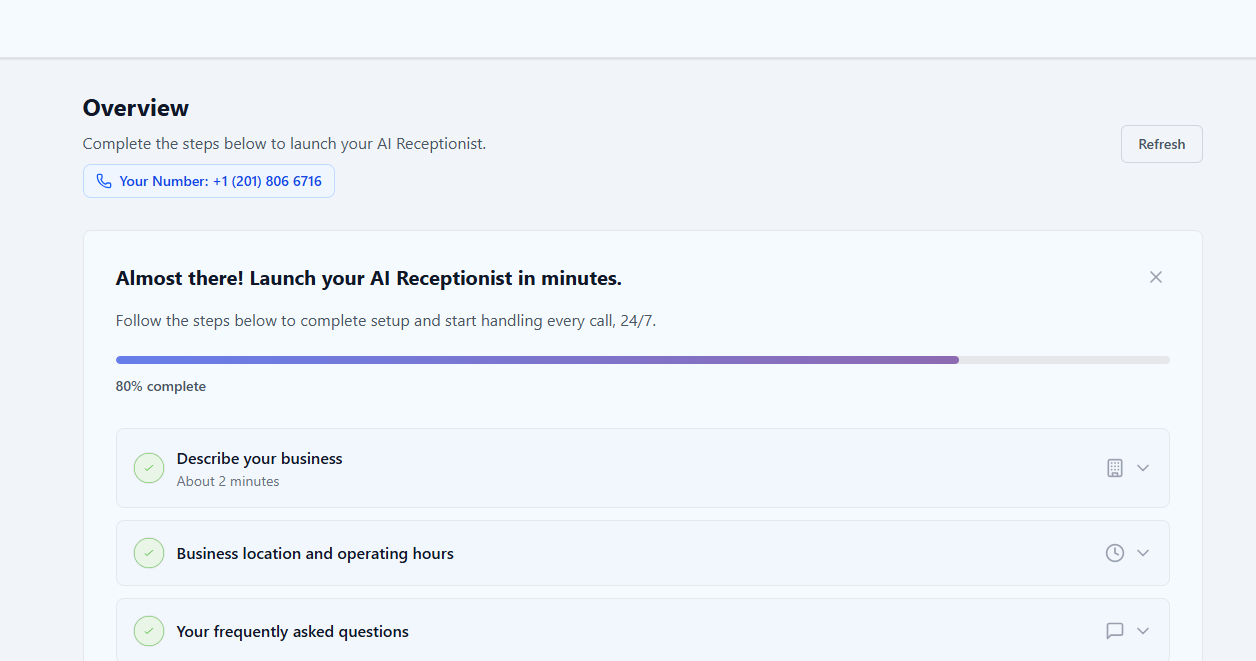
Keep your Recepta.ai phone number handy - you’ll need to enter it into Vonage’s forwarding settings.
Configuring Call Forwarding in Vonage
Vonage’s interface may change over time. For the most current instructions, we recommend consulting Vonage’s official documentation.Setup Instructions
Access Vonage Resources
Visit Vonage’s official call forwarding guide for the most up-to-date configuration instructions:Vonage: How to Forward Calls
Call Forwarding Strategies
Choose the strategy that best fits your business needs:Direct Forwarding (24/7 AI Coverage)
Direct Forwarding (24/7 AI Coverage)
Best for: Businesses wanting complete AI automationSetup: Forward all calls directly to Recepta.ai phone numberBenefits:
- No missed calls
- Consistent service 24/7
- Reduced operational costs
- Instant call pickup
- Predictable customer experience
Sequential Routing (Personal Line First, AI Backup)
Sequential Routing (Personal Line First, AI Backup)
Best for: Professionals who want to screen calls personallySetup: Ring your personal cell phone for 5-8 seconds, then forward to Recepta.ai if unansweredBenefits:
- Option for personal pickup
- AI handles missed calls
- No calls go to voicemail
- Flexible coverage
Business Hours Based (Time-Sensitive Routing)
Business Hours Based (Time-Sensitive Routing)
Best for: Businesses with defined operating hoursSetup: Different routing for business hours vs after-hoursBenefits:
- Optimize for different times
- Cost-effective coverage
- Team handles calls when available
- AI ensures 24/7 availability
- Custom holiday routing
Important Configuration Tips
Ring Time Management
If you choose to ring your personal cell phone before falling back to Recepta.ai:- Maximum Ring Time: 5-8 seconds (10 seconds absolute maximum)
- Sequential Mode: Ensure phones ring one after another, not simultaneously
- Caller Experience: Minimize wait time for better caller retention
- Test Thoroughly: Make multiple test calls to verify timing
- 0-5 seconds: Excellent caller retention
- 5-10 seconds: Good caller retention
- 10-15 seconds: Significant caller drop-off
- 15+ seconds: High abandonment rate
Preventing Infinite Call Loops
Safe Configuration Example:- Main Vonage Number: Forwards to Recepta.ai → ✅ Correct
- AI Agent Transfer Destination: Your direct cell phone → ✅ Correct
- ❌ WRONG: AI transfers back to main Vonage number (creates loop)
- Poor customer experience
- Potential service charges
- System overload
- Frustrated callers who hang up
Advanced Configuration Options
Business Hours Routing
Configure different routing rules based on your business hours:During Business Hours
Option 1: Route to your team with AI overflowOption 2: Direct to AI for consistent handling
After Hours
Route all calls directly to Recepta.ai for 24/7 coverage
Weekends
Configure weekend-specific routing rules
Holidays
Set special routing rules for holidays and special occasions
Multi-Level Routing Strategy
For businesses that want a hybrid approach:Alternative: Cell Phone Carrier Forwarding
If you want Vonage calls to ring your cell phone for 5-8 seconds before falling back to Recepta.ai, you can use your cell phone carrier’s conditional call forwarding feature.Setup Process
Configure Carrier Forwarding
Set up conditional call forwarding with your cell phone carrier:
- Forward on busy: To Recepta.ai
- Forward on no answer: To Recepta.ai (after 5-8 seconds)
Conditional call forwarding availability and setup vary by carrier. Contact your cell phone carrier for specific instructions.
Testing Your Configuration
Thorough testing ensures your setup works correctly in all scenarios:Troubleshooting
Calls Not Reaching Recepta.ai
Calls Not Reaching Recepta.ai
Diagnostic Steps:
- Verify correct Recepta.ai phone number is entered in Vonage
- Check that call forwarding is enabled and active
- Ensure your Recepta.ai agent is configured and active
- Review Vonage’s call routing settings
- Make test call and review logs in both systems
- Typo in Recepta.ai phone number
- Forwarding not activated
- Conflicting call handling rules
- AI agent not active or misconfigured
- Vonage service issue
Calls Going to Voicemail
Calls Going to Voicemail
Solutions:
- Reduce ring time before forwarding (max 10 seconds)
- Ensure Recepta.ai is set as primary forwarding destination
- Disable or extend voicemail delay in Vonage settings
- Check that forwarding rule takes precedence over voicemail
- Verify forwarding is active 24/7 (if desired)
Infinite Call Loops
Infinite Call Loops
Solutions:Warning Signs of a Loop:
- Use different phone numbers for transfers
- Never forward Vonage number to itself
- Configure AI transfers to direct lines (cell/desk phones)
- Review complete call flow logic
- Document your routing to avoid loops
- Calls disconnect automatically after ringing
- Unusual call duration patterns in logs
- Multiple entries for the same call
- Callers reporting being “bounced around”
Long Wait Times
Long Wait Times
Solutions:
- Reduce sequential ring time to 5-8 seconds maximum
- Eliminate unnecessary routing steps
- Consider direct forwarding to AI
- Remove simultaneous ringing (use sequential)
- Test and optimize ring duration
Conditional Forwarding Not Working
Conditional Forwarding Not Working
Solutions:
- Contact your cell phone carrier for support
- Verify conditional forwarding is supported on your plan
- Check forwarding codes are entered correctly
- Test both “busy” and “no answer” scenarios
- Consider using direct Vonage forwarding instead
Monitoring and Analytics
Tracking Performance
Vonage Analytics
Monitor call volume, routing patterns, and forwarding statistics
Recepta.ai Dashboard
Track AI performance, conversation quality, and outcomes
Call Logs
Review detailed logs from both systems to identify issues
Quality Metrics
Measure customer satisfaction and agent performance
Key Metrics to Monitor
- Call Answer Rate: Percentage of calls successfully handled
- Average Wait Time: Time before AI picks up
- Transfer Rate: How often AI transfers to humans
- Call Duration: Length of AI conversations
- Customer Satisfaction: Ratings and feedback
- Abandonment Rate: Calls that hang up before pickup
- Cost Savings: Compare to previous solution
Best Practices
Minimize Wait Time
Keep total ring times under 10 seconds to reduce caller drop-off
Use Different Numbers
Ensure transfer destinations use different numbers to prevent loops
Test Regularly
Test your setup monthly to catch configuration changes
Configure Holidays
Set up special routing for holidays and special events
Monitor Analytics
Review performance weekly to identify issues early
Document Setup
Keep detailed records of your configuration
Update AI Knowledge
Keep your AI agent’s knowledge base current
Sequential Over Simultaneous
Use sequential routing to prevent multiple answers
Use Cases and Examples
Example 1: Real Estate Agent
Scenario: Agent wants to personally answer when available Configuration:- Ring cell phone for 8 seconds
- Forward to Recepta.ai if busy or unanswered
- AI qualifies leads and schedules showings
- AI transfers urgent matters to cell (uses carrier conditional forwarding)
Example 2: Medical Practice
Scenario: Clinic with defined business hours Configuration:- Business hours: Ring front desk, overflow to AI
- After hours: Direct to AI
- AI schedules appointments, handles prescription refills
- Emergency calls transferred to on-call doctor
Example 3: Professional Services Firm
Scenario: Consulting firm wants consistent client experience Configuration:- All calls go directly to Recepta.ai
- AI routes to appropriate consultant based on inquiry
- After hours: AI only (schedules callbacks)
- AI handles FAQs about services and pricing
Next Steps
After configuring call forwarding:Configure Your Agent
Customize your AI agent’s responses and behavior
Set Up Transfers
Configure call transfer destinations and rules
Add Knowledge Base
Train your AI agent with company-specific information
View Analytics
Monitor performance and optimize call handling
Need Help?
Email Support
Contact our support team at support@recepta.ai
Vonage Support
Visit Vonage’s support for platform-specific questions
Schedule Demo
Book a personalized walkthrough with our team
Documentation
Browse our comprehensive documentation